For self-employed professionals with changing work locations and shifts

Plan the work. Get every rate right. Invoice without detective work.

Pompie connects your calendar, rate agreements, mileage and invoices. See what a shift or consultation will pay, then put completed work on an invoice without retyping it.

No payment details required · cancel monthly

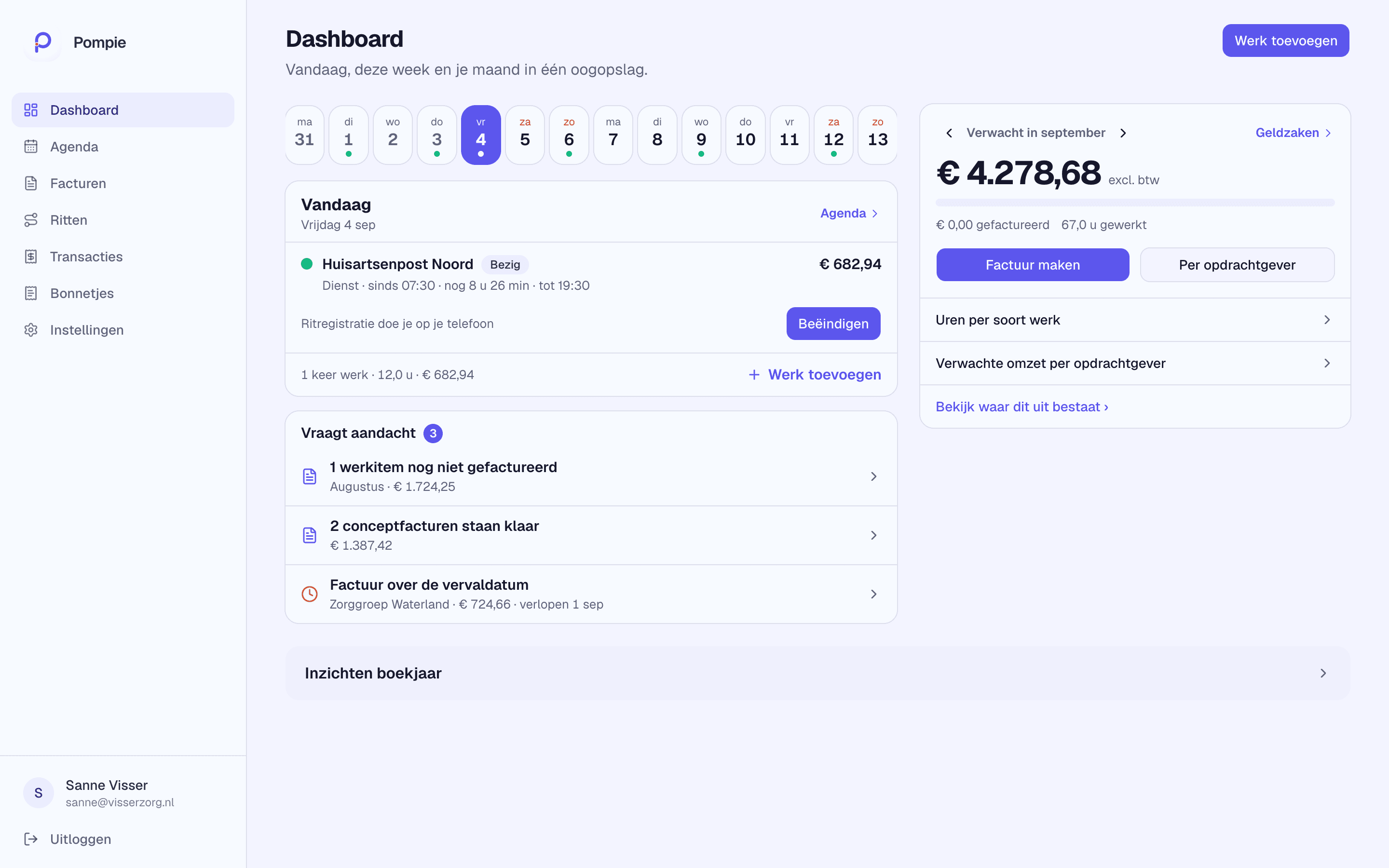
Pompie dashboard showing expected income, worked hours and upcoming shifts
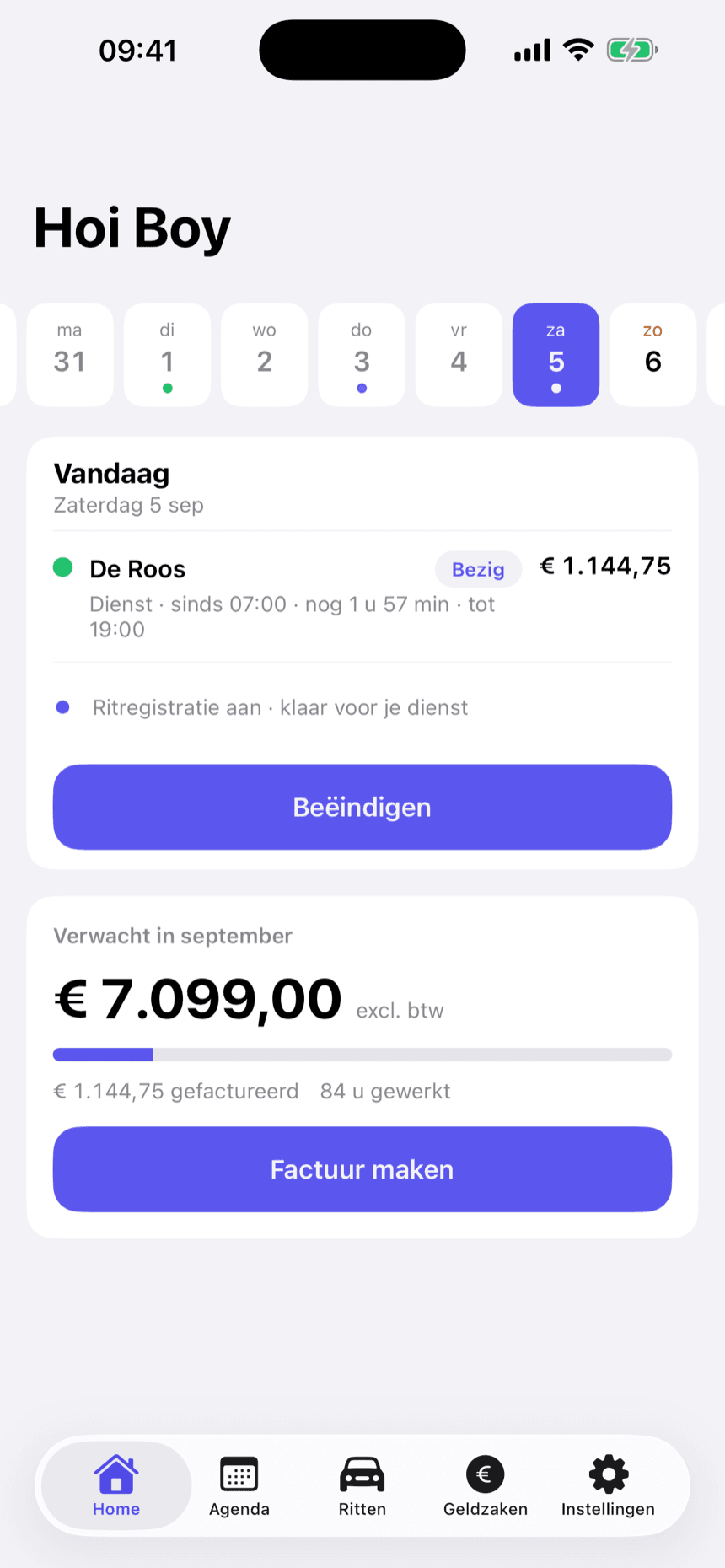
Pompie mobile app with an automatically recorded trip and a monthly overview

Built for changing shifts, consultations and multiple clients

No advertising trackers · servers and database in the EU

Dutch and English, with a complete dark mode

A rate Pompie works out for you

See exactly how an amount is calculated before invoicing

Choose whether a shift is paid hourly, as an amount for a standard duration, or as a fixed amount. Pompie immediately shows a checkable example.

Client agreement

€440 for 24 hours

Actual shift

€440 ÷ 24 × 20 hours

Amount on the invoice

€366.67

Pompie uses the exact hourly rate and rounds only the final amount.

Your admin follows your working day

No separate lists to reconstruct at the end of the month. Pompie connects the steps that already follow one another.

  1. 1

    Plan

    Add a shift or consultation to your calendar.

  2. 2

    Work

    Pompie applies the rate agreement you selected.

  3. 3

    Review

    Add hours, mileage and any billable items.

  4. 4

    Invoice

    Create a polished PDF invoice for each client.

Everything between your calendar and your accountant

Pompie follows the real order of your work: the shift first, then the details, the invoice and finally the financial overview.

Shifts and consultations, using your rates

Plan per client, choose an hourly rate, an amount for a standard duration or a fixed shift amount, then add evening, night and weekend supplements.

  • Consultations and 12–24 hour shifts
  • Checkable amounts for every client
  • Private calendar link for Google, Outlook and Apple
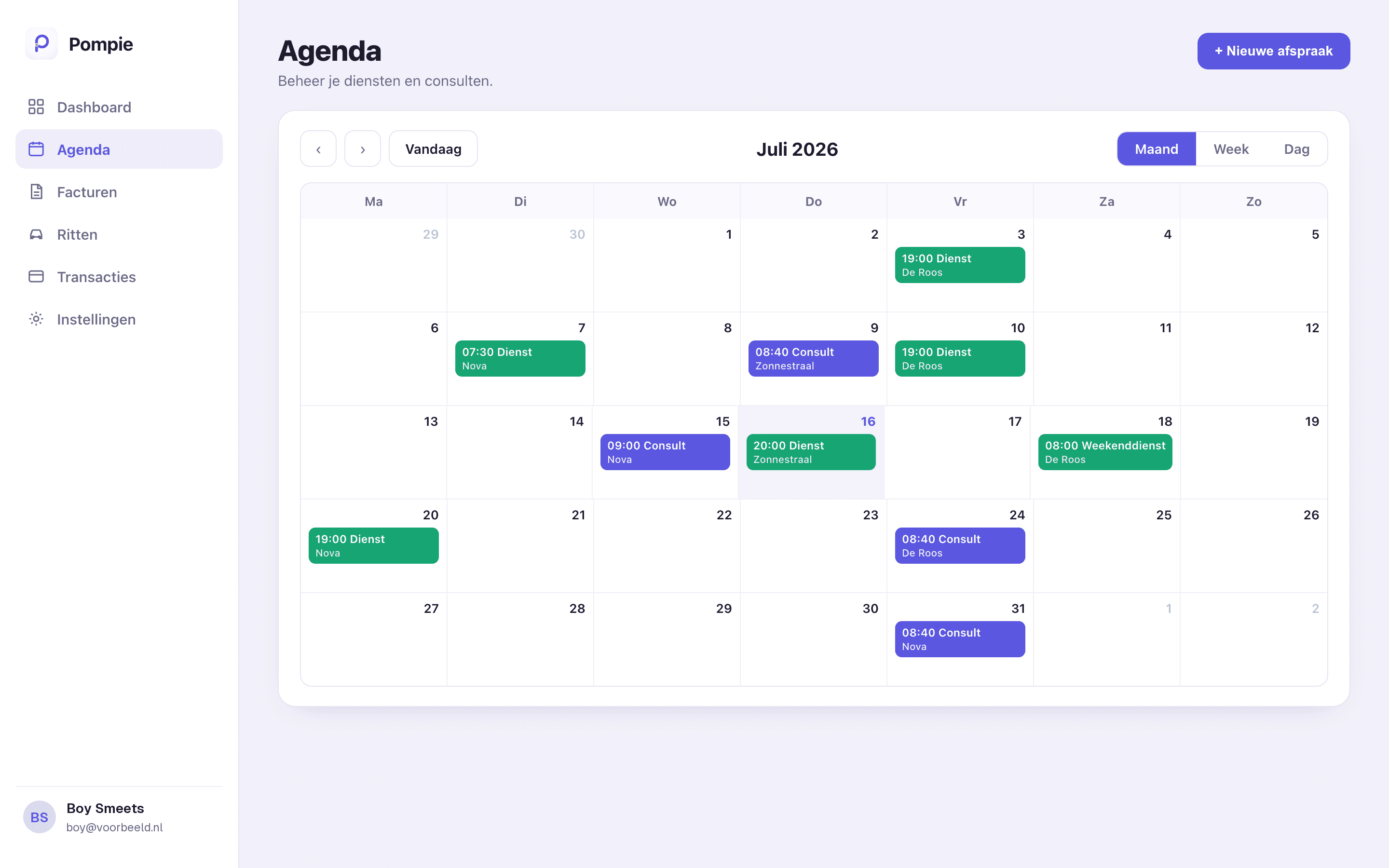
Pompie monthly calendar with shifts and consultations for different clients

Invoices that are almost ready already

Worked hours, mileage and billable items become invoice lines. Choose a template with your own logo and numbering, add a scan-to-pay QR and send a PDF to each client.

  • Invoice lines directly from your calendar
  • Templates with your own branding, logo and numbering
  • SEPA scan-to-pay QR, VAT and mileage allowance

Invoice 2026-07

North Technical Services

On-call shift 4 Jul · 19:00–07:00 · 12.0 h€1,140.00
Maintenance 8 Jul · 09:00–17:00 · 8.0 h€600.00
Travel · 42 km€9.66
Total€1,749.66
Ready to send

Business mileage, tracked automatically

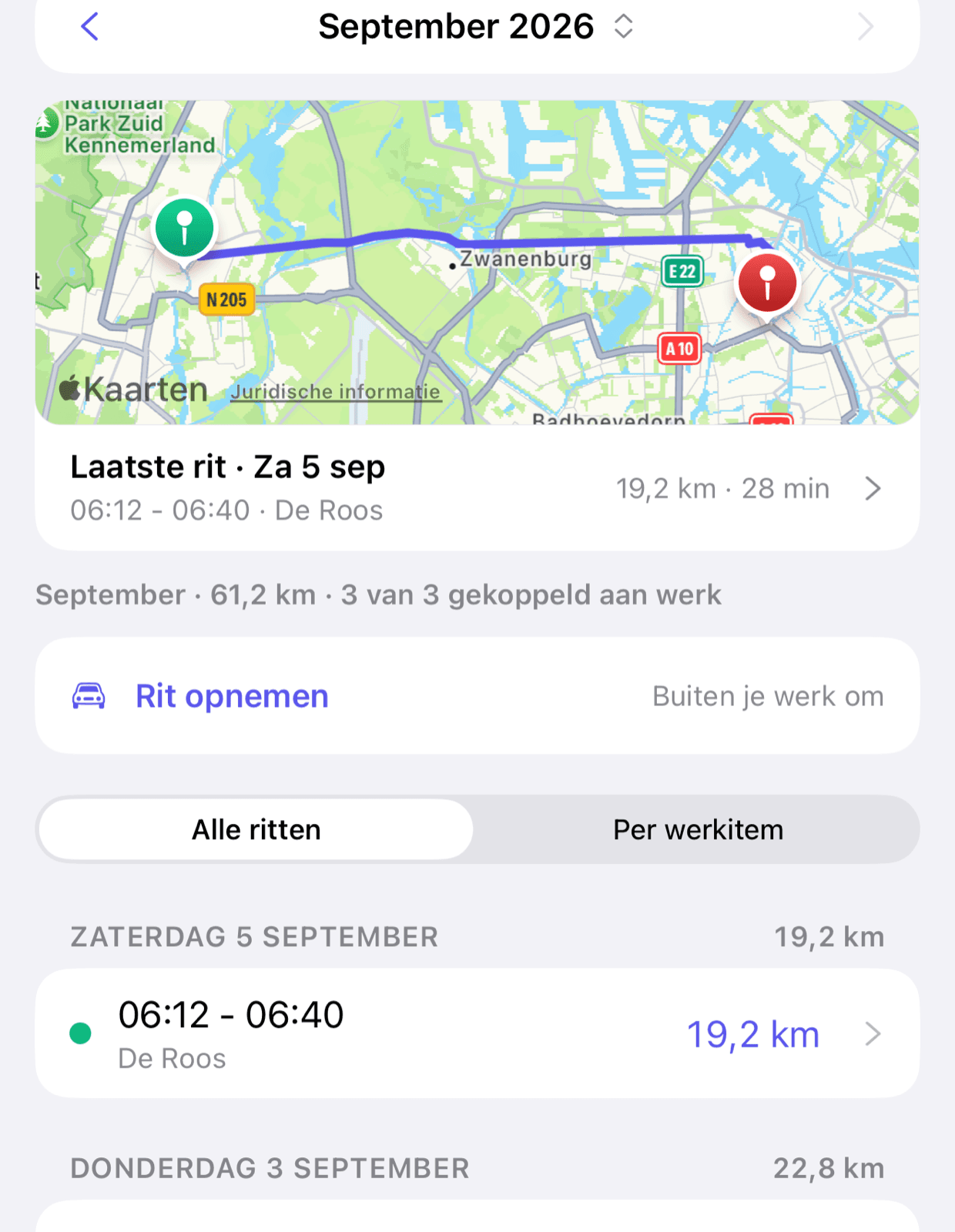
The app records your business drives in the background and draws the route on the map. Link a trip to its shift and the kilometres are ready as an invoice line — no more mileage logbook.

  • Drives are detected and recorded automatically
  • The route on a map, reviewable per trip
  • Kilometres flow straight onto your invoice
Work out what your kilometres are worth
Pompie app with an automatically recorded business trip and its route on the map

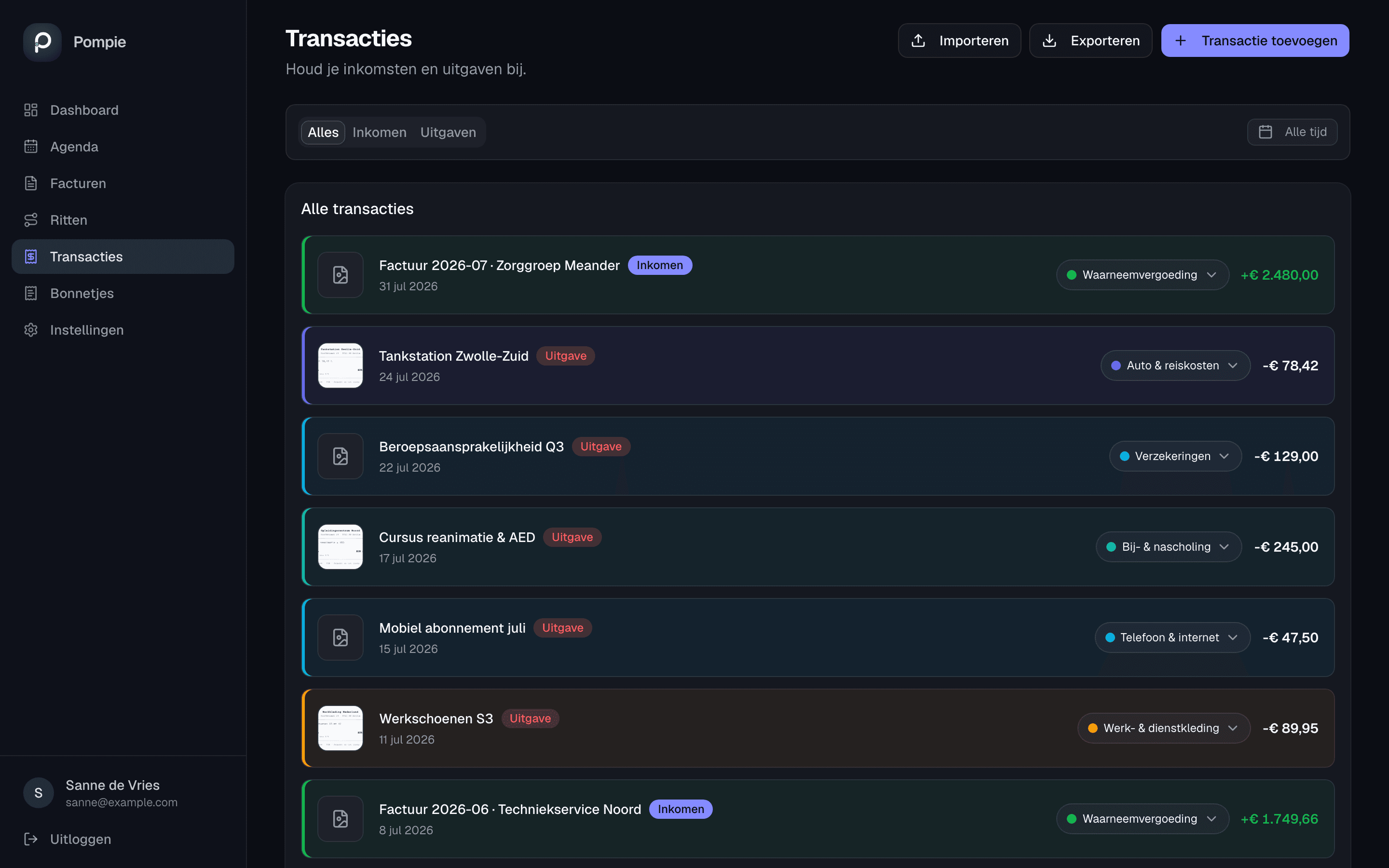
Income, expenses and receipts together

Import your bank statement as CSV, give the transactions a category and match your receipts to the payment they belong to. At the end of the quarter it all goes to your accountant as one file.

  • CSV import for ING, Rabobank, ABN AMRO, Knab, ASN/SNS/RegioBank, Revolut and bunq — or any other CSV with a date and an amount
  • Scan a receipt with your phone; Pompie finds the matching bank transaction
  • One export: an Excel file with the receipts in the same zip
How your records work in Pompie
Pompie transactions list with a category per transaction and linked receipts

What is yours, and what you set aside

On every paid invoice Pompie works out what is yours and what you set aside for income tax, pension or a buffer. You choose the percentages or a fixed amount per month; kilometres count separately.

  • Pots as a percentage of the work or a fixed monthly amount
  • Business mileage is shown separately in your split
  • The whole month's split on the Money tab
How setting money aside works in Pompie

Invoice 2026-07

North Technical Services

On-call shift 4 Jul · 19:00–07:00 · 12.0 h€1,140.00
Maintenance 8 Jul · 09:00–17:00 · 8.0 h€600.00
Travel · 42 km€9.66
Total€1,749.66
Ready to send
Pompie mobile app with an automatically recorded trip and a monthly overview

Pompie on your phone

Record it on the go. Reconstruct nothing at home.

Plan and complete shifts from your phone, and let the app record your business drives automatically. Every kilometre lands with the right shift and flows onto your invoice.

  • Automatic trip tracking in the background
  • Hours and mileage per shift
  • Dark mode after a night shift

The web app and the iPhone and Android apps are available now

Miss fewer kilometres

Keep business mileage with the shift it belongs to.

Retype less

Hours and trips flow directly into your invoice lines.

Calm after a night shift

A complete dark mode for early and late admin.

Your data stays yours

Servers and database in the EU, no advertising trackers, and exports for your records.

Built and supported in the Netherlands

Need a hand? Send us a message.

Have a question about a rate, invoice, integration or the app? Briefly describe it on the support page and we will get back to you.

Go to support
  • Questions about rates, invoices and integrations
  • Checkable rate examples
  • EU hosting and exportable data

One subscription. Everything included.

Start without payment details. After the trial, pay one clear price for every feature and cancel monthly.

Pompie Pro

30 days free

€9.92per month, excl. VAT

€12.00 per month including 21% Dutch VAT, deductible if you are eligible to reclaim VAT. Or €99.17 per year (€120.00 incl. VAT) — two months free.

  • Unlimited assignments and clients
  • Branded PDF invoices with scan-to-pay QR
  • Private ICS calendar link for Google, Outlook and Apple
  • Automatic mileage tracking via the app
  • Bank import, receipts and one export with the receipts included
  • Web app and the iPhone and Android apps available now
Start your 30-day free trial

Cancel monthly · iDEAL, SEPA or credit card

Questions before you begin

Everything about shifts, invoices, integrations, the mobile app and your data.

Who is Pompie built for?

Pompie is built for self-employed professionals who work on location for multiple clients with changing shifts, mileage and rates — including healthcare professionals, teachers, interpreters, security staff and technicians. You name your own kinds of work, with a colour and a rate — ‘Shift’ and ‘Consultation’ for a midwife, ‘Call-out’ and ‘Maintenance’ for a technician — and each kind gets its own block on your invoice.

Can Pompie calculate evening, night and weekend rates?

Yes. Choose an hourly rate, an amount for a standard duration or a fixed shift amount per client, then add supplements. Pompie shows an example before you save and calculates the right amount automatically.

How do I create an invoice from my shifts?

Worked hours, consultations, mileage and billable items are prepared as invoice lines. Review them, choose your own template and send a PDF invoice to each client.

Does Pompie work with my calendar?

Yes. Google Calendar, Outlook and Apple Calendar can subscribe to your private Pompie calendar link. Pompie publishes your work one way: changes from your other calendar do not return to Pompie, and your calendar app controls how often the schedule refreshes.

Can I process bank transactions and receipts?

Yes. You import a CSV file from your bank — ING, Rabobank, ABN AMRO, Knab, ASN/SNS/RegioBank, Revolut and bunq are recognised, and Pompie also reads any other CSV with a date and an amount column. You get a preview first, duplicates are skipped and one click undoes an import. Then scan your receipts; Pompie finds the matching bank transaction and exports everything together as one file.

Can I use Pompie on my phone?

Yes. Pompie is on the App Store and Google Play. In the app you plan and complete work, let business trips record themselves, scan receipts and send invoices — and everything is in the web app at once.

Is my data secure?

Passwords are hashed and sensitive integration credentials are stored encrypted. The servers and database are in the EU, and Pompie uses no advertising trackers. Mileage and transaction data can be exported.

Can I cancel monthly and how do I pay?

Yes. Cancel any month and keep access until the end of your paid period. Website payments are processed by Stripe; subscriptions bought in the mobile app are billed by Apple or Google.

Does Pompie help me set money aside for tax?

Yes. You choose once what part of your work you set aside — say 35% for income tax, a fixed amount for pension and 10% as a buffer. On every paid invoice you then see what is yours and what to transfer. Business travel in your private vehicle is deductible from profit at € 0.25 per km in the Netherlands in 2026. Mileage charged to your client is turnover.


Keep your evenings.

Record work as it happens and turn month-end into a quick review.

Start your free trial

30 days free · no payment details · cancel monthly